 LocalLM Lab
Decision models (Jev) in your app
Typed answers with probabilities, on the Mac or hosted, behind one API — new in 2.0
Want to try it first? Download JevDK, the playground for decision questions, or read its guide.
Most of us met language models as chatbots: you type, it writes back. A decision model is a different animal. It writes nothing. You give it a piece of text and a few fixed questions, and it answers each one with one of the options you allowed, plus how sure it is. TypeSafe's Jev made the idea popular in September 2026. This page starts with what that means if you're used to chatbots, then shows how the LocalLM Lab SDK runs decision models on the Mac and in the cloud, and how an app pairs one with the chat model it already has.
If you know chatbots, start here
With a chatbot, your app writes a prompt and gets back prose. When the app needs a decision — which team should handle this message, does this request need the web, is the user upset — the usual trick is to ask the chatbot and parse its reply. That works until it doesn't: the reply comes back as “Billing, probably”, or a paragraph, or a label you never offered, and nothing tells you how close the call was.
A decision model (a decider) skips the prose. Think of it as a reader filling in a form you designed: it reads one input and ticks one box per question.
| Input | Question | Answer |
|---|---|---|
| “Nothing loads since this morning, my whole team is stuck.” | Which team should handle this? (billing / technical / account) | technical 100% |
| Is the customer blocked from using the product right now? | Yes 96% | |
| Does the customer explicitly ask for money back? | No 97% |
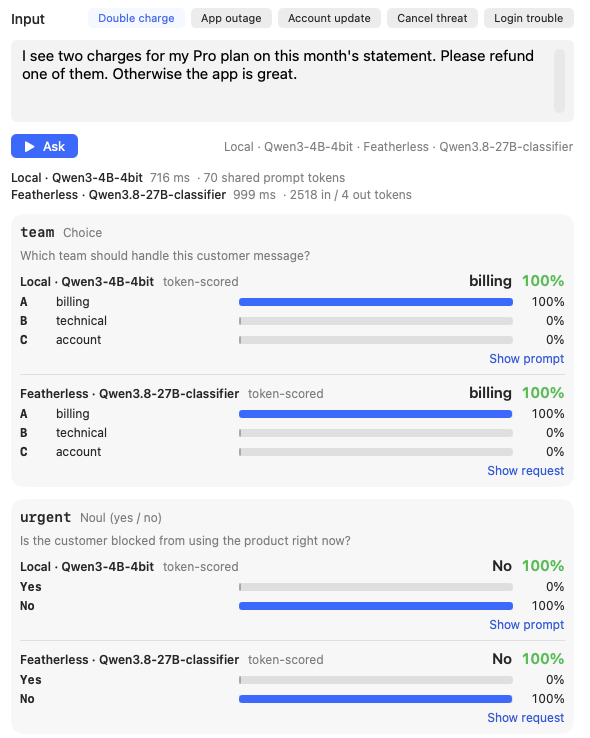
Your app then acts on the answers in ordinary code: send it to the technical team, mark it urgent, don't open a refund. Side by side:
| Chat model | Decision model | |
|---|---|---|
| You send | A prompt, often a whole conversation | One input and a few typed questions |
| You get back | Text you have to read or parse | One allowed answer per question, with probabilities |
| Can it answer “something else”? | Yes, any text | No: only the options you listed |
| Knowing how sure it is | Not really (“I'm fairly confident…”) | A number per option, which your code can put a threshold on |
| Speed | Seconds, longer for long replies | Tens to hundreds of milliseconds for several questions |
| Where the work goes | Writing the prompt | Writing the questions and testing them on real inputs |
That last row is the real change. A chatbot is forgiving: a vague prompt still gets a plausible reply. A decider does exactly what its questions say, so small wording changes can move answers, and you only find out by trying the questions on many inputs with the right answers marked. The SDK's playground, JevDK, exists for that (its guide).
↑ TopThree kinds of question
The SDK uses Jev's own names, so its documentation and ours line up:
- Noul (yes / no): “Does this user query need live data?” The answer is the probability of yes.
- Choice (one of several): “Which team should handle this?” with billing, technical, account, each with a short description. The answer is the winner, how sure it is, and a probability for every option.
- Score (a scale you describe in words): “How urgent is it?” with can wait, soon, now. The answer can land between levels (1.6 is “soon, leaning now”).
All the questions about one input are answered together, in one call. There is no system prompt: whatever a question needs to know goes in the input or in the question itself.
↑ TopWhat a decider is good at, and what it isn't
Good fits are the small, fixed choices inside an app:
- Routing: does this need web search, a bigger model, a tool, a person?
- Triage and tagging: which team, which category, how urgent, what tone.
- Gates: does this message contain personal information (before anything leaves the Mac)? Did the answer actually cover the question? Is this tool call safe to run without asking?
Poor fits:
- Anything that needs current facts. A decider judges the input with general knowledge; it doesn't look things up. “Does this query need live data?” is a good question. “Has this changed recently?” isn't.
- Writing anything. That's your chat model's job (see one model or two).
- Open-ended answers. If you can't list the options, it isn't a decision.
What if the decision needs knowledge about your product?
Say the decider routes bug reports to teams. It needs to know something about your software: which parts exist, and who owns what. But a decider only knows what's in the input and the questions; there's no background briefing to give it. So you hand it the knowledge in one of these ways:
- Ask what the report is about, and keep “who owns what” in your own code (usually best). Ask “which part of the product does this describe?” with options like checkout: cart, payment form, Stripe errors, then look the team up in a simple table in your app. The decider recognises the problem; your code knows the org chart, and a re-org changes the table, not the questions.
- Put the knowledge in the options. Describe each team by what it owns: payments: billing, invoices, the Checkout module. Good while each line stays short.
- Send it with the input. Along with the report, pass the facts your app already has (the screen the user was on, the app version, the modules in a crash report). Keep it short; long inputs are slower, and hosted services limit their size.
- Look up the relevant part first. For a big knowledge base, have your app (or your chat model) pick out the few relevant pieces and send only those.
Whichever you choose, test it the same way: real reports, the right answers marked, in JevDK. The JevDK guide has the code for each.
↑ Top“How sure” is the hard part
The probabilities are what make a decider useful: act when it's sure, and when it isn't, do something safer — ask the user, ask a bigger model, take the cautious path. But a number is only useful if it means what it says. If a decider says 80%, it should be right about 80% of the time on answers like that. That property is called calibration.
- TypeSafe's Jev is trained to make decisions and reports calibrated probabilities.
- An ordinary language model used as a decider (what Featherless and our on-device OpenJev do) reads off how likely the model was to say each answer. On a small model those numbers are often 100% even when it's wrong.
What that looks like
Here is a test run in JevDK: the same questions asked about real customer messages, with the right answers marked under each cell. Each cell has two answers: ① is a small decider running on the Mac (Qwen3 4B), ② is a hosted one (Featherless). A tinted cell is where the two disagree.
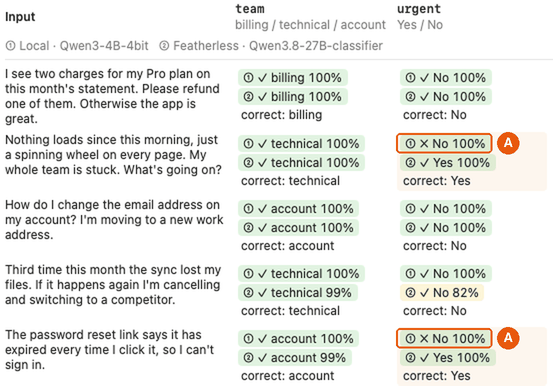
- A The local decider is wrong, and 100% sure. “My whole team is stuck” and “I can't sign in” are both a customer blocked from the product, and it says no. A threshold of “act when 95% sure” would act on both mistakes.
- The hosted decider gets both right, and on the cancellation threat it's only 82% sure: a number you can use.
JevDK can fit a calibration for the local decider from these marked answers: one adjustment per kind of question that makes its confidence honest. Here is the same grid with it applied:
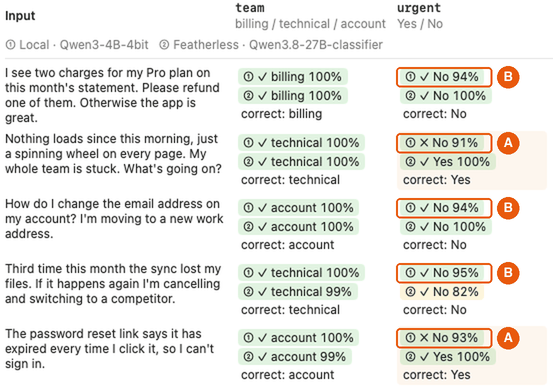
- A The two mistakes are no longer 100%: 91% and 93%. And they're still wrong. Calibration never changes which answer wins; every ✓ and ✗ is the same as before.
- B The right answers were softened too, to 94–95%. So on this question a wrong answer and a right one now look about the same. Calibration made the numbers honest; it can't make a weak question or a small model good at it. The fix here is to reword the question and test again, or send this question to the hosted decider, which got it right.
That's the lesson in one picture: a decider's confidence is only as good as the
testing behind it. Every answer from the SDK says which kind of probability it is
(Decision.fidelity), and until you've calibrated a local decider on your own
marked answers, don't put tight thresholds on its numbers.
Calibrate once in JevDK, then use it in your app
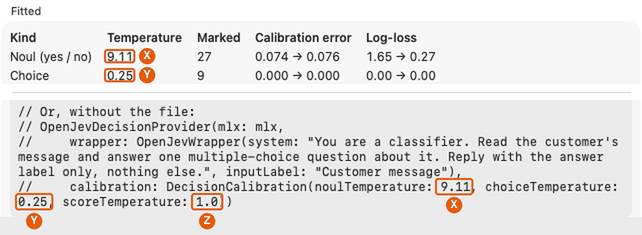
What a calibration is, in plain terms: three numbers that tell your app how much to tone down (or turn up) a local decider's “how sure” figures, one number for each kind of question: yes/no, choice, and scale. You work them out once, on your Mac, in JevDK (the free app for designing and testing these questions, download below), from answers you've marked right or wrong. Your app never does that work; it only uses the three numbers.
Getting the numbers in JevDK:
- Switch to Batch, paste a few dozen real inputs under Inputs, one per line, and click Ask all. A grid appears: one row per input, one column per question.
- Mark the right answers: under each answer in the grid is a small
mark… link. Click it and pick the correct answer for that input; it
then reads “correct: billing” (say), and each answer gets a ✓ or ✗.
Already have the right answers in a spreadsheet? Save it as CSV and use File →
Import Answers (CSV)… instead (an
inputcolumn, then one column per question). - With 30 or more marked answers per kind of question, click Calibrate… above the grid, then Fit calibration. A window like this opens:
Putting them in your app. Pick one of two ways:
- Let them travel with your questions (easiest). When your questions
are ready, JevDK can save them as a small file for your app
(File → Export Questions…). That file also holds the three
numbers. Add it to your app; when your app sets up its decider from the file, the
numbers are used automatically. In code, that's
OpenJevDecisionProvider(mlx:tunedWith:)with the loaded file. - Put the numbers in your code yourself. Click Copy code in the Calibrate window and paste the result where your app sets up its decider: it already has X, Y and Z filled in, along with the system instructions you tested with, which you should keep (the numbers only fit those instructions).
Afterwards: the numbers fit the model and instructions you tested, so if
you switch to a different model or change the instructions, fit them again in JevDK and
re-export. Your app can tell it's using calibrated numbers: each answer's
fidelity says .tokenScored(calibrated: true). Hosted TypeSafe
answers don't need any of this; they come calibrated.
Where Jev comes from: further reading
The idea and its vocabulary come from TypeSafe. Good places to read more:
- What Is Jev? TypeSafe's Decision Model Explained for Developers (OpenRouter) — the best short introduction if you know chatbots.
- System One, Choice, Noul and Score and Confidence and thresholds — TypeSafe's own documentation (docs.typesafe.ai).
- Jev on OpenRouter and its tutorial: access, the Decisions API, and cookbooks (gating tool calls, cheaper cascades, classification). Jev Lab has interactive demos.
- Simple Jev (Featherless): the same question format served on open models, with a playground, API docs and source.
- TypeSafe AI Releases Jev (InfoQ) — news coverage of the release.
One API, local or hosted
The SDK asks the same questions the same way whichever decider answers. You choose the decider with a route, like a chat model:
| Decider | Where it runs | Module | Probabilities |
|---|---|---|---|
| OpenJev (ours) | On the Mac, on an MLX model you choose | Inference | Read off the model; calibrate them yourself |
| TypeSafe Jev | Hosted, through OpenRouter (your key) | Remote | From a model trained to decide |
| Featherless Simple Jev | Hosted (your key, or a free rate-limited demo) | Remote | Read off the model, like OpenJev |
try lab.models.register(decision: OpenJevDecisionProvider(mlx: mlx))
lab.models.route(decision: "support", to: ModelID("openjev:mlx-community/Qwen3-4B-4bit")!)

let d = try await lab.decide(route: "support", state: .text(message), questions: [
    .choice("team", "Which team should handle this message?", criteria: [
        "billing": "payments, invoices and refunds",
        "technical": "bugs, outages and product errors",
        "account": "profile, login and subscription changes",
    ]),
    .noul("refund", "Does the customer explicitly ask for money back?"),
    .score("urgency", "How urgent is it?", criteria: ["can wait", "soon", "now"]),
])
d.choice("team")?.choice      // "technical"
d.noul("refund")              // 0.03
d.score("urgency")?.score     // 1.6
To use hosted Jev instead, register JevDecisionProvider(.openRouter(key:)) (or a
Featherless preset) and point the route at openrouter:typesafe/jev-1.13; the
questions and the code that reads the answers don't change. Hosted deciders are off until
you register one, and the questions and input are sent to that service when you do.
It works the other way round too:
jev-serve
answers hosted Jev's API from your Mac, so code written for hosted Jev can use OpenJev.
- OpenJev answers each question in one pass of the model, without generating text: it reads how likely the model is to say each option's label. The input is read once and shared by all the questions, so four questions on Qwen3 4B take about 150 ms on an Apple-silicon Mac.
- Use a dense model as the decider, not a mixture-of-experts one. In our tests an MoE model's probabilities shifted with how the prompt was split. The SDK flags an MoE decider with a warning.
- Local or hosted per question is your app's call. Ask the private
questions locally and the hard ones hosted with two
decidecalls, or ask a privacy question locally first and send nothing out unless it says no.
One model or two: the decider and your chat model
A decider rarely works alone. The pattern the SDK is built for: a decider makes the typed choices in a feature (does this need the web, which tool, is it sensitive), and a chat model writes the text. Both on the Mac, so the routing itself costs no privacy. That raises a practical question for a local app: one model in memory, or two?
Share one model
The decider can run on the chat model's own weights: route OpenJev and your chat route to the same MLX model, and only one copy is in memory. This is the low-memory option. It works when the chat model is dense (not MoE); a big chat model also makes a slower decider than a small dedicated one.
Keep two models resident
Usually better: a small dedicated decider (Qwen3 4B, 2.6 GB) next to the chat model you already use. The catch is memory. By default the SDK keeps one local model loaded, so a decider asked on every turn would push the chat model out and force a reload. One call sets the pair up:
lab.models.route(decision: "triage", to: ModelID("openjev:mlx-community/Qwen3-4B-4bit")!)
lab.models.route("writer", to: ModelID("mlx:mlx-community/Qwen3.8-27B-4bit")!)
let pairing = try await lab.models.pair(decision: "triage", generator: "writer")
pair(decision:generator:) checks that both models' weights together fit the
memory budget (70% of the Mac's RAM by default), makes room for both in the model cache and
loads them. If they don't fit it throws with the numbers and changes nothing. A shared model
counts once; a hosted decider costs no memory, so only the chat model is loaded. Measured on a
64 GB Mac with a Qwen3 4B decider:
| Chat model | Paired in | Models in memory | Next decision |
|---|---|---|---|
| The same Qwen3 4B (shared) | 1.0 s | 1 | 59 ms, no reload |
| Qwen3.8 27B (15 GB) | 2.3 s | 2 | 63 ms, no reload |
| Apple's on-device model | 0.9 s | 1 | 62 ms |
Work in progress. Two co-resident models work today, and these parts are still being worked on:
- Keeping the pair loaded under memory pressure. When the system is short of memory, the model cache can still unload everything except the most recently used model, so the next call reloads the other one.
- Smaller Macs. The measurements above are from a 64 GB Mac; a pair on a 16 GB Mac hasn't been measured yet.
- Loading speed of vision-capable models. A text-only use of a model that also handles images currently loads its vision version, which was about 50% slower as a decider on Qwen3.8 27B.
From playground to shipped app
Because the questions are the work, the SDK carries them from testing to shipping intact:
- Write and try the questions in JevDK on real inputs, local and hosted deciders side by side.
- Mark the right answers on 50–150 real inputs (or import them as a CSV). Now every run is scored.
- Fix the questions that miss, compare models (each run can be appended to a results CSV), and fit a calibration for the local decider you pick.
- Export the questions for your app (File → Export Questions): a file (
DecisionQuestionSet) with the questions exactly as tested, plus the model, version and calibration they were tested with. Your app loads it, so what ships is what you tested:let set = try DecisionQuestionSet(contentsOf: Bundle.main.url(forResource: "support.decisions", withExtension: "json")!) try lab.models.register(decision: OpenJevDecisionProvider(mlx: mlx, tunedWith: set)) - Or serve it to other programs. Not writing a Swift app? JevDK can also
export a config for
jev-serve, a small server that answers hosted Jev's API (the same requests OpenRouter and Featherless take) using your tested setup on the Mac. Code that already calls hosted Jev, in Python, JavaScript or anything else, just points athttp://127.0.0.1:8746instead: private, free, and the same answers your tests saw. - Keep testing in CI:
lab.evaluateruns your answer set through any decider and reports accuracy per question, so a model, SDK or wording change that breaks answers fails a test.
Start from working code
JevDK
is the playground above, open source and built only on the SDK's public API: write questions,
run them on a local MLX model and on hosted Jev, see every option's probability and the exact
prompt or request, run a batch grid against your marked answers, calibrate, compare models
and export for your app. Its
developer's
guide walks through the whole workflow in plain English, with a worked customer-support
example. The API itself is in the
SDK
guide (“Decision models”), and the rest of the SDK on the
SDK overview.
Contact
Building with decision models, or hit a rough edge? neuron@thisbrain.ai or our Discord.
↑ Top