 LocalLM Lab
JevDK: a developer's guide
Design and test the questions your app asks a decision model — on your Mac, against hosted Jev, before they're in code
This guide is for app developers who want a small model to make decisions inside their app: route a message, pick a team, spot personal information, check an answer. It explains, in plain English, how that differs from a chatbot, and how to use JevDK to get questions you can trust.
You don't need to know anything about how models work inside. You do need some patience: a decision model is closer to building a small test suite than to writing a prompt.
New to decision models altogether? Start with Decision models (Jev) in your app: what they are if you know chatbots, and links to TypeSafe's and others' documentation.
Get JevDK
JevDK is open source (Apache 2.0) at github.com/ancientcomputing/jevdk, built only on the LocalLM Lab SDK's public API. It needs an Apple-silicon Mac with macOS 27.
- Download the app: JevDK 0.2.2 (signed and notarized DMG, 16 MB; all releases). Open it, drag JevDK to Applications, and open it from there. It includes jev-serve: JevDK → Install jev-serve Command… puts it on your PATH.
- From source (Xcode 27): the SDK downloads automatically, no other setup.
Orgit clone https://github.com/ancientcomputing/jevdk.git cd jevdk/jevdk swift build -c release .build/release/JevDKopen -a Xcode JevDK.xcodeprojand Run the JevDK scheme.
First run: Examples → Customer support loads four questions and sample messages. For answers on this Mac, pick a model with Models (toolbar); Qwen3-4B-4bit (2.3 GB) is the tested starting point. To compare with a hosted decider, turn one on in Backends: the Featherless demo needs no key; Featherless and OpenRouter (TypeSafe) keys are kept in your Keychain. Hosted deciders receive the inputs you send them, and the status bar says where they go.
What a decision model does
A chatbot takes a prompt and writes a reply. You read the reply and judge it.
A decision model ("decider") takes one input, such as a customer message, and answers a few fixed questions about it. Each answer is one of the options you allowed, plus how sure the model is. It writes no text.
| Input | Question | Answer |
|---|---|---|
| "Nothing loads since this morning, my whole team is stuck." | Which team should handle this? (billing / technical / account) | technical, 100% |
| Is the customer blocked from using the product right now? | Yes, 96% | |
| Does the customer explicitly ask for money back? | No, 97% |
Your app then acts on the answers in ordinary code: send it to the technical team, mark it urgent, don't open a refund. Nothing is generated, so it's fast (about 150 ms for four questions on a small local model) and the answers are always something your code can switch on.
The SDK call looks like this:
let d = try await lab.decide(route: "support", state: .text(message), questions: [
          .choice("team", "Which team should handle this customer message?", criteria: [
              "billing": "payments, invoices and refunds",
              "technical": "bugs, outages and product errors",
              "account": "profile, login and subscription changes",
          ]),
          .noul("blocked", "Is the customer blocked from using the product right now?"),
          .noul("refund", "Does the customer explicitly ask for money back?"),
      ])
      if let team = d.choice("team"), team.confidence > 0.8 { route(to: team.choice) }
Why this is harder than a chatbot
With a chatbot you judge each reply as you read it. With a decider, nobody reads the answers: your code acts on them, thousands of times, unseen. So you can't judge a question by trying it once. You have to know how often it's right, on inputs like the ones your app will see. That means collecting examples, writing down the right answers, and measuring. JevDK is the tool for that.
↑ TopWhen a decider is a good fit
Good fits: questions a careful person could answer from the input alone, quickly and consistently.
- Routing: which team, which tool, which kind of request.
- Spotting things: personal information, a refund request, an angry customer, spam.
- Checking: does this answer address the question? Is this review about shipping?
Poor fits:
- Anything that needs current facts. The model has no internet and its knowledge stops at its training date. "Does this query need live data?" is fine: the wording shows it. "Is this price still correct?" isn't.
- Writing or explaining. That's the generator's job (a chat model), after the decider has routed the request.
- Judgements even people would disagree on. If two colleagues wouldn't give the same answer, the model won't be consistent either.
When the decision needs your product's knowledge
Say the decider routes bug reports to teams. To do that it has to know something about your software: which parts exist, and who owns what. It only knows what's in the input and the questions. There's no system prompt to put background in: hosted deciders don't have one, and the SDK leaves it out so local and hosted behave the same. So the knowledge has to reach it one of these ways, best first:
- Ask what the report is about, and keep “who owns what” in your code. The decider is good at recognising which part of the product a report describes; it shouldn't need to know your org chart. Ask about components, then look the team up in an ordinary table:
When teams reorganise, you change the table, not the questions, so there's nothing to re-test or recalibrate. The product knowledge lives in the option descriptions: write them in the words users actually use (“Stripe errors”, “files not syncing”).let d = try await lab.decide(route: "triage", state: .text(report), questions: [ .choice("component", "Which part of the product does this bug report describe?", criteria: [ "checkout": "cart, payment form, Stripe errors, order confirmation", "sync": "files not syncing, conflicts, the desktop sync client", "auth": "sign-in, password reset, SSO, two-factor codes", "editor": "the document editor, formatting, comments, undo", ]), ]) let team = owners[d.choice("component")!.choice] // your table: component → team - Describe each team by what it owns. If teams map neatly onto areas, make the teams the options:
"payments": "billing, invoices, the Checkout module, Stripe integration". Fine while each description stays short. A local decider takes up to 26 options; hosted Jev up to 255. - Send the knowledge with the input. When a line per option isn't enough, send structured context alongside the report, as JSON:
The best context is what your app already knows as data: the screen the user was on, the app version, the modules in a stack trace. It's precise and free. Keep it short: a local decider reads the input once for all the questions in a call, but a long input is still slower, and hosted services cap the size (6,000 characters on the Featherless demo).struct Ticket: Encodable { let report: String; let screen: String; let stackTraceModules: [String] } let d = try await lab.decide(route: "triage", state: try .encoding(ticket), questions: [...]) - Look up the relevant part first. For a big knowledge base (an architecture doc, a wiki), don't send all of it. Have your app find the few relevant pieces (match file paths or error codes, or search your docs) and send only those. If finding them is itself a judgement, let your chat model do that step and give the decider its short summary.
Don't put product knowledge in JevDK's System instructions: only the local decider sees them, and calibration is tied to their exact words. And don't ask questions whose answer isn't in the input or the options (“Which team owns the sync engine?”); like current facts, the decider can only judge what it's given.
Test it in JevDK as usual: real reports in Batch, the knowledge in the option descriptions or pasted into each input the way your app will send it, the right component or team marked. Compare the approaches by their ✓s on your own reports.
↑ TopThe five things that decide your results
- The model. Different models are good at different questions. You find out by measuring, not by reading a leaderboard.
- How each question is worded. The single biggest lever. One word can flip answers.
- The system instructions (local models only): the text that frames every question. Also changes answers; JevDK lets you edit it, then your app uses the same text.
- Your answer set: example inputs with the right answers written down. Without it you are guessing.
- Calibration: making the model's "how sure" numbers mean what they say. Optional, and only once the answers themselves are good.
The workflow below works through them in that order.
↑ TopThe workflow in JevDK
Step 1. Write your questions
On the left, Add question and pick a type:
- Noul (yes / no): "Does the customer explicitly ask for money back?" Best for spotting things.
- Choice: one of several options, each with a short description ("billing: payments, invoices and refunds"). Best for routing.
- Score: a point on a scale (0 none … 3 deep). Small models are weakest here; use it only when you truly need a scale, and consider a yes/no question at the threshold you care about instead.
Give each question a short name (what your code reads, e.g. refund) and write the question the model reads.
Wording rules that held up in testing:
- Ask about what the text says, not what you'd infer. "Does the customer explicitly ask for money back?" beats "Does the customer want a refund?"
- Put context in the question. "This post was made on a gardening forum. Which problem, if any, does it have?" Hosted deciders never see the system instructions, so context there is lost on them.
- Describe choice options, briefly. "code" is vague; "writing, fixing or explaining code or software" isn't.
- Plain and direct. "Does this user query need live data?" worked better than longer, more careful wordings on a small model.
- One thing per question. "Is the customer angry or threatening to leave?" mixes two; split it if they matter separately.
Step 2. Try single inputs
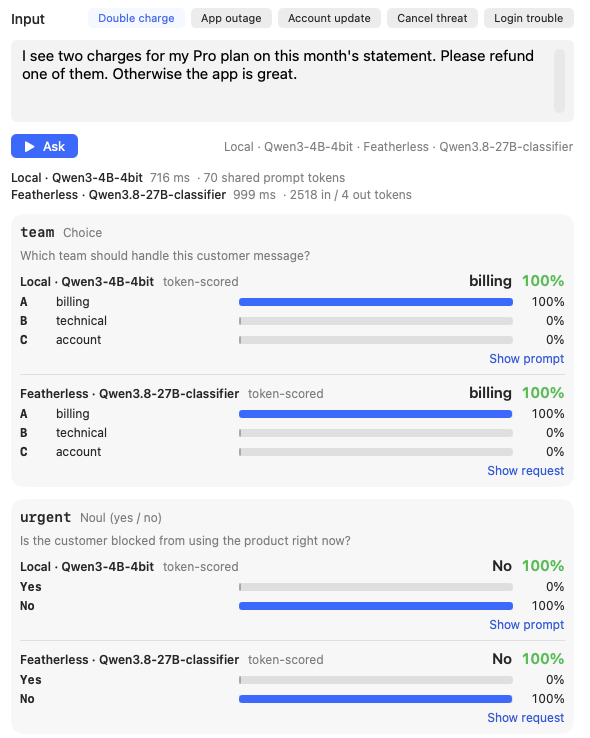
In Single input, type a realistic input and press Ask (⌘↩). Every question is answered independently (no question sees another's answer). For each, you get a bar per option, the chosen answer and how sure it was.
What to look at:
- Is the answer right? Obviously. But don't stop at a few successes; one input proves little.
- "Off format" warnings. The model wanted to answer something other than your options. The question or the options need rewording.
- Show prompt shows exactly what the local model read. If a question behaves oddly, read it as the model does.
Use this step to shape questions. Use the next steps to trust them.
Step 3. Build your answer set
Collect 50 to 150 real inputs like the ones your app will see. Real is better than invented: real messages are messier, and the mess is where models go wrong. Include:
- the common cases (most of your traffic),
- the awkward ones you already know about ("fix my invoice" is not a refund request),
- a few that should clearly be "none" or "no".
Paste them into Batch, one per line, and Ask all. If you already have them in a spreadsheet, save it as CSV with an input column and one column per question holding the correct answer (blank where you haven't decided), and use File → Import Answers (CSV)… instead: the inputs and your marks load together. Yes/no answers can be Yes/No, true/false or 1/0; a choice is its key; a score is its level number or text. Then, under each cell, use mark… to record the correct answer. This is the slow part, and the most valuable: from now on every run is scored against your answers.
Tips:
- Mark answers as you want your app to behave, not as you guess the model will.
- If you hesitate over a mark, the question is probably ambiguous. Note it; you'll reword it in step 5.
- Save Workspace (⌘S) keeps everything for JevDK. File → Export Answers (CSV)… saves the inputs and marks as a CSV: that's your test suite. Keep it with your app and grow it when you find new failure cases. JevDK also remembers your workspace between launches.
Step 4. Run the batch and read the grid
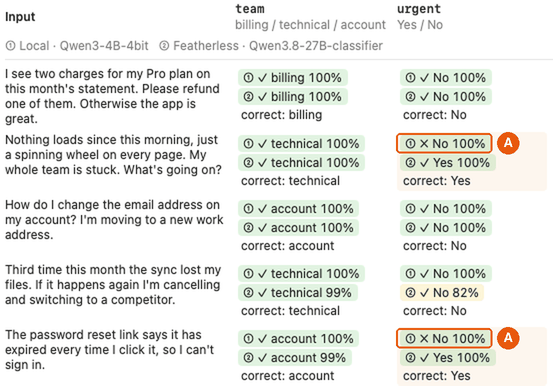
Each row is an input, each column a question, each cell an answer. With answers marked, every backend's line shows ✓ or ✗, its answer and how sure it was. Tinted cells mean backends disagree. Hide the questions panel (sidebar button, top left) to see all the columns.
Read it in this order:
- Which columns have the ✗s? A question that's wrong often needs rewording, not a different model.
- Are the misses confident? "✗ No 100%" is worse than "✗ No 55%": the second can be caught with a threshold, the first can't.
- Do several models miss the same row? Then check your mark and the wording first. In our test, every model said a customer whose mobile app crashed (desktop fine) was "blocked". That says more about the question than the models.
Step 5. Fix the questions, then run again
Change one thing, Ask all again, compare. Typical fixes:
- Make the question literal: "blocked from using the product" → "Does the message say the customer cannot use the product at all right now?"
- Add or sharpen an option description.
- Split a question that mixes two things.
- Use Duplicate on a question card to run two wordings side by side and keep the better one.
Stop when the remaining misses are ones you can live with, or can catch (step 8).
Step 6. Compare models
The model is the answer to "which of these works best on my questions", and only your answer set can tell you. JevDK doesn't keep a leaderboard on purpose.
- Models (toolbar): download a few candidates. Small dense instruct models suit deciding; mixture-of-experts models are flagged because their probabilities were unstable in testing.
- Backends (toolbar): optionally add a hosted decider (Featherless, or TypeSafe on OpenRouter) as a reference point.
- Run the batch with model A, then Results CSV (Batch toolbar) → append. Switch to model B, run, append.
- Open the CSV in Numbers or Excel. A pivot table of
correctbymodelandquestionis per-question accuracy;question_msanddecision_msare speed.
Weigh up:
| Why it matters | |
|---|---|
| Accuracy per question | The question your app relies on most matters most. |
| Confidence when wrong | Low confidence on misses means a threshold can catch them. |
| Speed | Added to every request your app routes. |
| Size | A local decider sits next to your chat model in memory. |
| Local vs hosted | Local is private, free and offline; hosted can be more accurate and better calibrated. |
Step 7. Calibrate the model you picked (local only)
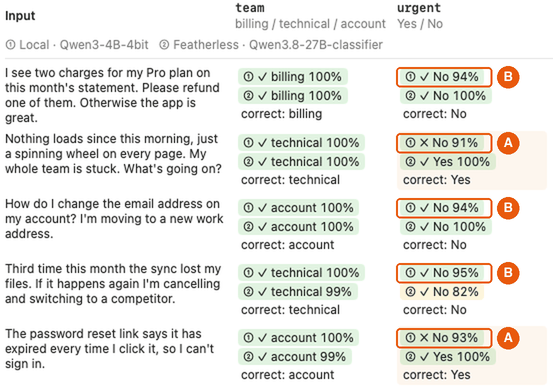
A small model often says "100%" even when wrong; another might say "60%" when it's nearly always right. Calibration adjusts the numbers so "80% sure" means right about 80% of the time. It never changes which answer wins.
You need it when your app acts on the confidence (thresholds, second opinions). You don't if you only use the top answer.
- Have at least 30 marked answers per question type you use (yes/no, choice, score).
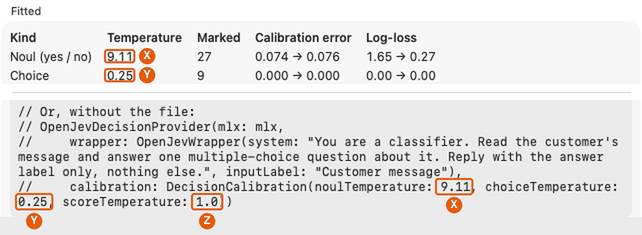
- Calibrate… → Fit calibration. JevDK finds one adjustment ("temperature") per question type. Above 1 means the model was over-confident and gets softened; below 1, under-confident and gets sharpened.
- Read the before → after table. Lower is better on both measures (see Reading the numbers).
- Turn on Show local results calibrated to see what your app will see.
- If you change the model or the system instructions later, JevDK flags the calibration until you redo it.
Use the calibration in your app
A calibration is just three numbers: the Temperature column of the Calibrate window's Fitted table, X for yes/no questions, Y for choice and Z for score (a kind you have no questions of stays at 1.0, “no change”). Your app doesn't work them out again; it only needs to be given them.
Where to find them: in JevDK, after marking answers in Batch (steps 3–4), click Calibrate… above the grid and Fit calibration. The window that opens looks like this:
Two ways to give them to your app:
- Let them travel with your questions (easiest). File → Export Questions… saves your questions as a file for your app, and that file includes the three numbers. Add the file to your app and set up the decider from it; the numbers are used automatically (step 8):
let set = try DecisionQuestionSet(contentsOf: url) let openjev = OpenJevDecisionProvider(mlx: mlx, tunedWith: set) // the numbers come with the file - Put them in your code yourself. Copy code in the Calibrate window copies ready-to-paste code with X, Y and Z filled in, plus the system instructions you tested with. Paste it where your app sets up its decider, and keep the instructions: the numbers only fit them.
let openjev = OpenJevDecisionProvider(mlx: mlx,
    wrapper: OpenJevWrapper(system: "…", inputLabel: "…"),      // as tested in JevDK
    calibration: DecisionCalibration(noulTemperature: X, choiceTemperature: Y, scoreTemperature: Z))
Afterwards, your app's answers say they're calibrated (fidelity == .tokenScored(calibrated: true)). The numbers fit the model version, system instructions and kinds of question you tested, so fit them again and re-export when any of those changes; openjev.tuningMismatch(for:) tells your app when the model on the device isn't the one you calibrated. Hosted deciders don't need this: TypeSafe's Jev comes calibrated.
What calibration can't do: fix wrong answers. In our test, a confidently wrong answer stayed wrong; it just became less confidently wrong. Get the questions right first (steps 4 and 5).
Step 8. Ship it
Use the same questions, model, system instructions and calibration you tested. File → Export Questions… writes them into one file (support.decisions.json); add it to your app and load it:
let set = try DecisionQuestionSet(contentsOf: Bundle.main.url(forResource: "support.decisions", withExtension: "json")!)
      let openjev = OpenJevDecisionProvider(mlx: mlx, tunedWith: set)   // the tested wrapper and calibration
      try lab.models.register(decision: openjev)
      lab.models.route(decision: "support", to: ModelID("openjev:mlx-community/Qwen3-4B-4bit")!)

      let d = try await lab.decide(route: "support", state: .text(message), questions: set.questions)
Your app now asks exactly the questions you tested; to change one, change it in JevDK, test, and export again. openjev.tuningMismatch(for:) tells you if the model on the device isn't the one you tested (e.g. a newer revision).
Keep testing in your app's CI. With the exported answer set, lab.evaluate runs every example and scores it, so a model, SDK or question change that breaks answers fails a test:
let answers = try DecisionAnswerSet(csv: String(contentsOf: answersURL, encoding: .utf8))
      let result = try await lab.evaluate(route: "support", questions: set.questions, answerSet: answers)
      #expect(result.score("refund")!.accuracy >= 0.95)
Not a Swift app, or several apps? Serve the tested setup over HTTP instead: File → Export Server Config… writes a config for jev-serve, which answers hosted Jev's API (OpenRouter's and Featherless's) on this Mac. jev-serve comes with the JevDK download: choose JevDK → Install jev-serve Command… once to put it on your PATH. Code that already calls hosted Jev, in any language, switches by changing its base URL:
jev-serve --config jev-serve.json
curl -s http://127.0.0.1:8746/v1/classifier -H "Authorization: Bearer $TOKEN" -d @request.json
Patterns that work:
- A threshold: act on the answer when it's sure; otherwise do something safer (ask a person, ask a bigger model, take the cautious path). In our test, "below 90%, get a second opinion" would have flagged 7 of 64 answers and caught all three mistakes of one model.
- Local first, hosted second: answer easy questions locally; send only the hard or unsure ones to a hosted decider. Your app decides the split (one
decidecall per backend). - Privacy gate first: ask "does this contain personal information?" locally, and send nothing to a hosted service unless it says no.
- Keep the decider loaded:
lab.models.pair(decision:generator:)keeps the decider and your chat model in memory together, so routing every message doesn't reload a model. - Keep your answer set: re-run it (in JevDK or with
lab.evaluate) whenever you change a question, the model or the instructions, and when you upgrade the SDK. - Keep inputs short: a decider needs the message, not the whole conversation. Send the last few turns; hosted services limit input size (
DecisionLimits.maxStateCharacters).
JevDK's files
The File menu groups the five kinds of file JevDK reads and writes:
| File menu | The file | What's in it | Use it to |
|---|---|---|---|
| Workspace: Open…, Save Workspace (⌘S), Save Workspace As… | Customer support.jevdk.json, JevDK's own format | Everything: questions, system instructions, the input and batch list, your marks, the calibration | Pick your work back up, or hand it to a colleague. JevDK also keeps your last workspace between launches. |
| For your app: Export Questions… (⌘E) | customer-support.decisions.json, the SDK's DecisionQuestionSet | The questions exactly as tested, plus the model, version, system instructions and calibration. No inputs or marks. | Bundle it in your app (step 8). |
| For your app: Export Server Config… | jev-serve.json | Where jev-serve listens, an optional token, and the models it serves, each with its version, system instructions and calibration | Serve the tested setup over hosted Jev's HTTP API on your Mac. Exporting again adds or replaces this question set's entry. |
| Test data: Import / Export Answers (CSV)… | customer-support.answers.csv | Your inputs and the right answers: an input column, then one column per question | Edit test cases in a spreadsheet, share them, run them in your app's tests with lab.evaluate. |
| Test data: Append Run to Results CSV… | jevdk-results.csv, grows with every run | Every answer from every backend in a run, with the model, timing and whether it was right | Compare models and wordings over time (step 6). |
While you work, Save Workspace. When the questions are ready, Export Questions, and Export Answers for your app's tests. Open… also reads an exported .decisions.json, so a file you shipped can come back into JevDK.
A worked example: customer support
Sixteen made-up customer messages, four questions (team, blocked, refund, angry), correct answers marked, run on three deciders. Real results, 2026-10-03:
| team | blocked | refund | angry | Total | |
|---|---|---|---|---|---|
| Featherless Qwen3.8-27B (hosted) | 15/16 | 15/16 | 16/16 | 15/16 | 61/64 |
| Featherless Qwen3.5-4B (hosted) | 16/16 | 15/16 | 15/16 | 15/16 | 61/64 |
| Qwen3-4B on this Mac | 15/16 | 12/16 | 16/16 | 15/16 | 58/64 |
What a developer learns from this:
- Same total, different weaknesses. The two hosted models both scored 61/64 but failed on different messages. Totals hide what matters; look per question.
- The local model's weak spot is one question. Four of its six misses are
blocked. That points at rewording that question (step 5) or sending just that question to a hosted decider (step 8), not at abandoning the local model. - Disagree with every model? Check yourself. All three said the mobile-crash customer (desktop works) was blocked. Arguably they're right and the question is ambiguous.
- Confidence behaved differently per model. The 27B was about 98% sure when right and 70% when wrong: thresholds work well. The local 4B said 100% on everything, right or wrong; after calibration it was 93% on right answers and 83% on wrong ones: more honest, but still not a clean separation. That's a sign the
blockedquestion needs work more than calibration does.
Sixteen messages are enough to show the method, not to choose a model. Use 50 or more.
↑ TopReading the numbers
- Confidence: how sure the model says it is about its top answer. Not the same as how often it's right, unless it's calibrated.
- Accuracy: share of answers matching your marks. The headline number, per question.
- Calibration error: how far "how sure it says" is from "how often it's right", averaged. 0 is perfect; 0.05 is good; 0.15 means its percentages are misleading.
- Log-loss: punishes being confidently wrong. Lower is better. A big drop after calibration means the model was over-confident.
- On format (label mass): how much of the model's probability went to your options at all. Below 90% means it wanted to say something else: reword.
Common mistakes
- Judging a question by one input. Always run the batch.
- Inventing tidy test inputs. Real inputs fail in ways invented ones don't.
- Asking for facts the model can't know. Keep questions answerable from the input.
- Calibrating to fix wrong answers. It doesn't; fix the wording or the model.
- Changing the model or instructions without re-running. Answers and calibration are tied to both.
- Putting context in the system instructions and using a hosted decider. It never sees them.
- Trusting the total. Look per question, and at how sure the misses were.
- Using a mixture-of-experts model as the decider. Use it as the chat model instead.
Glossary
- Decider / decision model: a model that answers fixed questions with one of your options and a probability, instead of writing text.
- Noul, Choice, Score: the three question types: yes/no, one of several options, a point on a scale. (Names from TypeSafe's Jev.)
- Answer set: example inputs with the correct answers marked. Your test suite. JevDK imports and exports it as CSV (File → Import / Export Answers).
- Workspace: JevDK's own file (⌘S / ⌘O) with everything you're working on. Not for your app; for that, Export Questions. JevDK's files compares the five kinds of file.
- Backend: where the decider runs: locally (OpenJev on this Mac) or hosted (Featherless, TypeSafe).
- System instructions / wrapper: the text that frames every question for a local model.
- Calibration / temperature: a per-question-type adjustment that makes confidence match how often the model is right.
- Batch: the same questions asked about many inputs at once.
- Results CSV: the file JevDK appends each batch run to, for comparing models over time.
Contact
Trying JevDK? Tell us what worked and what didn't: neuron@thisbrain.ai or our Discord.
↑ Top