 LocalLM Lab
jev-serve: hosted Jev's API on your Mac
Point the decision calls you already make to OpenRouter or Featherless at your own Mac — same JSON, private, free
jev-serve is a small server that takes the same requests as hosted Jev — TypeSafe's Jev on OpenRouter and Featherless's classifier — and answers them with OpenJev, the LocalLM Lab SDK's decider, on a model on your Mac. Code that already calls hosted Jev, in Python, JavaScript, Go or a shell script, switches by changing its base URL. Nothing leaves the Mac, and nothing is billed.
It serves the setup you tested in JevDK: the model at the exact version you tested, your system instructions and your calibration, from a config file JevDK writes.
New to decision models? Start with Decision models (Jev) in your app.
Get jev-serve
jev-serve comes with JevDK. It needs an Apple-silicon Mac with macOS 27.
- Download JevDK 0.2.2 (signed and notarized DMG, 16 MB; all releases), drag JevDK to Applications and open it.
- Choose JevDK → Install jev-serve Command… (asks for your password once). It puts
jev-serveon your PATH, linked to the copy inside JevDK, so it updates when JevDK does. - Try it, no config needed:
The first run downloads the model (2.3 GB), with progress, then listens onjev-serve --model mlx-community/Qwen3-4B-4bithttp://127.0.0.1:8746. This serves the model with default system instructions and no calibration, so its confidence numbers aren't to be trusted yet; for that, serve the setup you tested.
It's open source (Apache 2.0) at github.com/ancientcomputing/jevdk, about 500 lines on the SDK's public API; swift build -c release builds it (Xcode 27).
Switch your code
OpenRouter's and Featherless's decision APIs take the same request and return the same response; they differ in where you send it. jev-serve answers on both paths:
| Your code calls | Hosted | jev-serve |
|---|---|---|
| TypeSafe's Jev on OpenRouter | https://openrouter.ai/api/alpha/decisions | http://127.0.0.1:8746/api/alpha/decisions |
| Featherless's classifier | https://api.featherless.ai/v1/classifier | http://127.0.0.1:8746/v1/classifier |
Then two more things change:
- The key. Send the token from jev-serve's config instead of your OpenRouter or Featherless key, in the same
Authorization: Bearer …header. Without a token in the config, no header is needed. - The
modelfield. jev-serve serves the models in its config, by their names there (or their Hugging Face repo ids). A hosted model name such astypesafe/jev-1.13gets a 404 that lists what is served. Leavemodelout to use the config's default.
With curl:
curl -s http://127.0.0.1:8746/v1/classifier \
  -H "Authorization: Bearer $JEV_SERVE_TOKEN" -H "Content-Type: application/json" \
  -d '{
    "state": "Nothing loads since this morning, my whole team is stuck.",
    "questions": {
      "team":    {"type": "choice", "instructions": "Which team should handle this message?",
                  "criteria": {"billing": "payments, invoices and refunds",
                               "technical": "bugs, outages and product errors",
                               "account": "profile, login and subscription changes"}},
      "refund":  {"type": "noul", "instructions": "Does the customer explicitly ask for money back?"},
      "urgency": {"type": "score", "instructions": "How urgent is it?", "criteria": ["can wait", "soon", "now"]}
    }
  }'
The answer is hosted Jev's shape, plus two fields of its own (below):
{"model": "mlx-community/Qwen3-4B-4bit",
 "answers": {
   "team":    {"type": "choice", "choice": "technical", "confidence": 0.99,
               "probabilities": {"billing": 0.0, "technical": 0.99, "account": 0.01}},
   "refund":  {"type": "noul", "noul": 0.03},
   "urgency": {"type": "score", "score": 1.44, "confidence": 0.56,
               "probabilities": {"0": 0.0, "1": 0.56, "2": 0.44},
               "legend": {"0": "can wait", "1": "soon", "2": "now"}}},
 "usage": {"input_tokens": 56, "output_tokens": 0, "cost": 0},
 "fidelity": "tokenScored", "calibrated": true}
In Python (requests), keep the base URL in one place so switching is one setting:
import os, requests

BASE = os.environ.get("JEV_BASE_URL", "http://127.0.0.1:8746/v1")   # was https://api.featherless.ai/v1
KEY  = os.environ.get("JEV_KEY")                                    # jev-serve's token, or None

def decide(state, questions, model=None):
    body = {"state": state, "questions": questions}
    if model: body["model"] = model
    headers = {"Authorization": f"Bearer {KEY}"} if KEY else {}
    r = requests.post(f"{BASE}/classifier", json=body, headers=headers, timeout=30)
    r.raise_for_status()
    return r.json()["answers"]
In JavaScript (fetch, Node 18+ or Deno):
const BASE = process.env.JEV_BASE_URL ?? "http://127.0.0.1:8746/api";   // was https://openrouter.ai/api
const KEY = process.env.JEV_KEY;

async function decide(state, questions) {
  const r = await fetch(`${BASE}/alpha/decisions`, {
    method: "POST",
    headers: { "Content-Type": "application/json", ...(KEY && { Authorization: `Bearer ${KEY}` }) },
    body: JSON.stringify({ state, questions }),
  });
  if (!r.ok) throw new Error((await r.json()).error.message);
  return (await r.json()).answers;
}
From Swift, the SDK's own hosted client works too: point a JevProviderConfig at http://127.0.0.1:8746/v1/classifier. (In a Swift app you can also skip the server and run OpenJev in-process; see the JevDK guide, step 8.)
Questions keep the order you wrote them in, in the request and in the answers. state can be text or any JSON object.
What's different from hosted Jev
The JSON is the same; the decider behind it isn't. TypeSafe's Jev is a model trained to make decisions. OpenJev asks an ordinary language model each question and reads how likely it is to say each option, without generating text. That shows up in a few places:
| Hosted Jev | jev-serve (OpenJev) | |
|---|---|---|
| Where the probabilities come from | A model trained to decide | A language model's next-token probabilities. Honest only once calibrated: the response says which with "fidelity": "tokenScored" and "calibrated": true or false |
| Limits | Up to 255 choice options and 50 score levels (Featherless's documented limits) | 64 questions, 26 choice options, 10 score levels per request. Over a limit is a 400 that says which |
confidence | Reported separately; can differ from the top probability | The top answer's probability |
noul | Featherless clamps it to 0.01–0.99 | Not clamped: P(yes) ÷ (P(yes) + P(no)) |
usage | Tokens and cost | The input's tokens; output_tokens and cost are 0 |
options (OpenRouter), messages and images (Featherless) | Supported | Ignored, not rejected. Put the last few chat turns in state, as TypeSafe advises |
| Model choice | The service's models; typesafe/jev-router picks one for you | The models in your config, by name |
| Speed | A network round trip | About 80–150 ms per request on Qwen3-4B, one request at a time |
Same questions, different deciders, different answers sometimes. Before switching production code, run your test inputs through both and compare; JevDK does that side by side.
Hosted details here are as we checked them on 2026-10-03; for the services themselves, see OpenRouter's Jev guide and Featherless's Simple Jev docs.
↑ TopServe the setup you tested
--model is for trying it. For real use, serve a config from JevDK, so jev-serve answers the way your tests did:
- In JevDK, write and test your questions, pick a local model and calibrate it (the workflow).
- File → Export Server Config… writes
jev-serve.json: where to listen, an optional token, and one entry per question set, with the model, its exact version, the system instructions and the calibration. Export from another question set to add a second entry to the same file. The file is readable only by you. - Start it:
$ jev-serve --config jev-serve.json jev-serve on http://127.0.0.1:8746 (token required) customer-support (default) mlx-community/Qwen3-4B-4bit @ 4dcb3d1 calibrated OpenRouter clients: base URL http://127.0.0.1:8746/api (POST /alpha/decisions) Featherless clients: base URL http://127.0.0.1:8746/v1 (POST /classifier) - Check it:
jev-serve --config jev-serve.json --self-checkasks every served model the same questions over HTTP and directly, checks the answers match, and exits (0 if they all do). Run it after changing the config, the model or JevDK.
A config with one entry looks like this (the token shortened):
{
  "format": 1,
  "listen": { "host": "127.0.0.1", "port": 8746 },
  "token": "…",
  "defaultModel": "customer-support",
  "maxStateCharacters": 20000,
  "models": [
    { "name": "customer-support",
      "tuning": {
        "model": "openjev:mlx-community/Qwen3-4B-4bit",
        "revision": "4dcb3d101c2a062e5c1d4bb173588c54ea6c4d25",
        "system": "You answer questions about a piece of text. …",
        "inputLabel": "Text",
        "calibration": { "noulTemperature": 9.11, "choiceTemperature": 0.25, "scoreTemperature": 1 } } }
  ]
}
Each entry's name is what callers put in model; revision is the model version you tested; system and inputLabel are the system instructions. JevDK writes all of it, and you can edit it by hand.
Calibration
A small local model often says "100% sure" even when it's wrong. Calibration adjusts its numbers so that "80% sure" means right about 80% of the time. It never changes which answer wins; it makes the confidence, probabilities and noul values honest. You need it when the calling code acts on those numbers (a threshold, a second opinion, a person for the unsure ones); you don't if it only uses the top answer. Hosted Jev doesn't need this: TypeSafe's Jev comes calibrated.
A calibration is three numbers, the calibration object in the config: one adjustment ("temperature") per kind of question, noulTemperature for yes/no, choiceTemperature for choice and scoreTemperature for score. Above 1 softens an over-confident model; below 1 sharpens an under-confident one; 1 is no change (a kind you have no questions of stays at 1).
Where they come from: JevDK fits them from your marked answers (at least 30 per kind of question): Batch, mark the right answers, Calibrate…, Fit calibration. They appear in the Temperature column of the Calibrate window, and Export Server Config… writes them into the entry. The JevDK guide, step 7, walks through it:
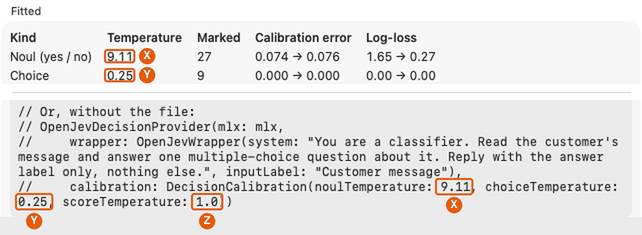
noulTemperature, Y choiceTemperature, Z scoreTemperature (1.0 here: this example has no score questions). The same numbers go into the config.How to tell it's in use: the startup line says calibrated next to the model; every response carries "calibrated": true; and GET /v1/models lists it per model. With false, read the numbers as rankings, not as how often the answer is right.
When it stops fitting: the numbers fit the model version, system instructions and kinds of question they were fitted on. If the model on the Mac isn't the version in the entry's revision, jev-serve serves it without the calibration and logs a warning naming both versions, rather than apply numbers fitted to another model. After changing the model, the instructions or the questions, fit again in JevDK and export again (it replaces that entry).
What it can't do: fix wrong answers. A confidently wrong answer stays wrong, only less confident. Get the questions right first; JevDK's batch grid shows where they go wrong.
The model is pinned. Each entry names the model version you tested. Before it accepts requests, jev-serve makes that version ready: uses it if it's on the Mac, verifies a copy another tool left in the Hugging Face cache, or checks and downloads it. If the version on the Mac isn't the one the calibration was fitted on, it serves the model without the calibration and says so. --no-download makes a missing model an error instead.
Running it
- This Mac only, by default. It listens on
127.0.0.1: any program on the Mac can call it, and the token keeps out everything that doesn't have it. - Plain HTTP. Listening on another address (
--host 0.0.0.0, or"host"in the config) works but logs a warning: inputs and the token would cross the network unencrypted. Put it behind something that adds TLS if other machines must reach it. - One decision at a time, in arrival order (one GPU). Up to 32 more wait their turn; beyond that, a 503 says to retry.
- Inputs aren't logged. One line per request: route, model, number of questions, status, time.
--log-bodieslogs the bodies, for debugging only. - Not for browsers. It sends no CORS headers, so a web page can't call it.
- Memory. The served models stay loaded: Qwen3-4B needs about 2.3 GB.
Alongside LM Studio, Ollama or another local server
A common setup: a chat model in LM Studio (or Ollama, or LocalLM Lab) writes the replies, and jev-serve makes the quick decisions around them (which team, is it urgent, does it contain personal information). In theory, the two run side by side as separate programs. We haven't tested this setup yet; here's what to expect:
- Ports don't clash. jev-serve uses 8746; LM Studio's server defaults to 1234 and Ollama's to 11434. Change jev-serve's with
--portor the config if something else has it. - Memory adds up. Each keeps its model loaded, in the Mac's shared memory, and macOS lets the GPU use only part of that memory. Add the two models' sizes (a 4B decider is about 2.3 GB) and leave room for your other apps. If the Mac starts swapping, both get much slower; a smaller chat model or decider fixes it.
- The GPU is shared. When both are working at once, they take turns: a decision that takes about 100 ms on its own takes longer while the other is writing a long reply, and the reply slows a little too. Decisions are short, so in practice it's mostly felt as a little extra delay.
- Separate downloads. LM Studio and Ollama keep models in their own folders, so jev-serve downloads its own copy of a model even if it's the same one. Use a model that's good as a decider for jev-serve (JevDK helps you pick); it needn't be your chat model.
Reference: routes, errors, options
| Route | What it is |
|---|---|
POST /api/alpha/decisions | OpenRouter's path (TypeSafe's Jev) |
POST /v1/classifier | Featherless's path; the same body |
GET /v1/models | The served models, OpenAI-style ({"data": [{"id": …}]}), with each one's repo, version and whether it's calibrated |
GET /health | {"status": "ok", "models": […]}; needs no token, for scripts |
Errors use hosted Jev's shape, {"error": {"message", "type", "code"}}:
| Status | When |
|---|---|
| 400 | Malformed JSON, a question that can't be asked, over a limit, or state over the config's maxStateCharacters; the message says what's wrong |
| 401 | A token is configured and the request's is missing or wrong |
| 404 | A model that isn't served (the message lists what is), or an unknown route |
| 405 | The wrong method for the route |
| 413 | A body over 1 MB |
| 503 | Too many requests waiting, or the model isn't available |
| 500 | Anything else, with the decider's message |
jev-serve --config <file> | --model <repo>
          [--host 127.0.0.1] [--port 8746] [--no-download] [--log-bodies] [--self-check]
jev-serve --version | --help
More: the README (the config format and how it works), and the SDK guide's section on jev-serve.
↑ TopContact
Using jev-serve? Tell us what worked and what didn't: neuron@thisbrain.ai or our Discord.
↑ Top