 LocalLM
 Lab
A Mac app for trying models, tools and MCP servers before you build with them: Apple's on-device model, open-weight models you download and run on Apple Silicon (Qwen, Gemma, Phi, gpt-oss and more), and hosted providers when you need a bigger model. Try them in Prompt Playground, or serve them as an OpenAI-compatible API with API Lab. It is built on the LocalLM SDK, and it is where we test what the SDK does. Free, and private by default.
New names: the SDK, formerly the LocalLM Lab SDK, is now the LocalLM SDK, and this site is LocalLM. The app keeps its name, LocalLM Lab.
One build for macOS 26 and 27 on Apple Silicon, Apple Intelligence enabled — on macOS 26 the Apple on-device model runs; open-weight (MLX) models, hosted providers, and Private Cloud Compute need macOS 27. See the known issues.
Why LocalLM Lab matters
An Apple Silicon Mac is a genuinely capable place to run language models. Every Mac with Apple Intelligence already ships one — Apple's Foundation Models framework runs it directly on your Mac's silicon — and the same unified memory and GPU can run open-weight models too, downloaded once and run via MLX, from small, fast ones to large models that take on work you'd otherwise send to a cloud API. No network calls, no per-token costs, no data leaving your machine. LocalLM Lab exists to make running them easy — pick a model, download it if it isn't already there, and find out what it can and can't do on your own hardware, whether you're experimenting, building against it, or just learning about AI, before committing to it in a real product.
The SDK that LocalLM Lab runs on is free, and it is how you add features like these to your own Mac app. Build with the SDK →
↑ TopWhat you get
LocalLM Lab 3.0 is a single Dock app — Prompt Playground, AI Models, Connectors, MCP Servers, and API Lab in one process, hotkey between them. One app, one SDK, one set of connectors and MCP tools — several ways to reach whichever model is doing the work.
Run models — locally, or hosted when you need it
Prompt Playground
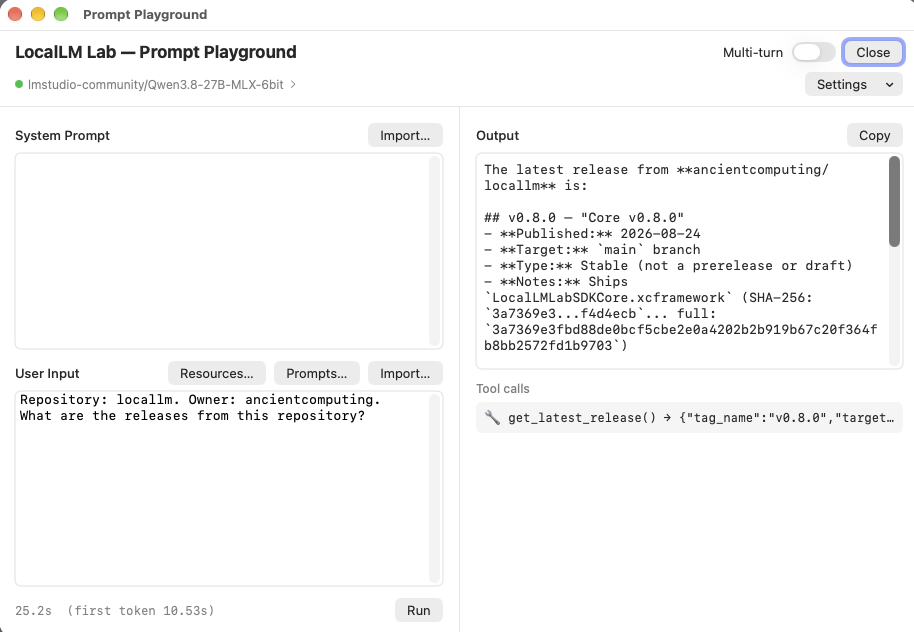
Prompt Playground is where you try a model out — including how it behaves with tools. Pick a model, turn on the connectors or MCP servers you want it to have, write or paste in a system prompt, type or import a user input, and hit Run to see exactly how it responds — tool calls and all — with a stopwatch showing how long it took.
Turn on Benchmark (macOS 27) to time a run in detail: time to first token, prompt and generation speed, and how much memory the model actually uses on your Mac. Save as CSV after each run to line up models — or the 4-, 6- and 8-bit versions of one — side by side, or copy a one-line summary to share. How Benchmark works →
By default every run is independent — no conversation memory carried between runs — so you can freely vary the system prompt, the input, the tools you've enabled, or the model itself to see how each change shapes the response. Flip Multi-turn on to keep a conversation instead. When a connector or MCP tool is enabled, a Tool calls list shows every call the model actually made, not just the final answer. Output renders verbatim, including raw JSON, so you can test structured-output prompts too; for open-weight models that emit chain-of-thought, a "Thinking…" pane keeps it separate from the answer (or a per-model Turn thinking off setting skips it).
The system prompt and user input aren't simply concatenated into one blob of
text — they're sent as distinct roles through Apple's FoundationModels
API. The system prompt becomes a session's instructions; the user
input is the message passed to respond(to:):
LanguageModelSession(instructions: systemPrompt)
    .respond(to: userInput)
Every run is appended to a plain-text log at
~/Library/Logs/LocalLM Lab/dev.log — one timestamped entry per run, with the model, system prompt,
user input, each tool call and its output, and the answer each clearly labeled. Open
it in any text editor to review or search past runs; it isn't cleared between
launches.
AI Models
The AI Models panel is where you pick which model runs on your Mac. Apple's on-device model is there out of the box; on macOS 27 you can also download open-weight models — from small, fast ones to large models that use most of your Mac's memory — and run them fully locally via MLX. When you do want a bigger model, add a hosted provider (Claude, GPT, OpenRouter, or any OpenAI-compatible server) with your own key. Whichever one you pick, the rest of the app — your connectors, your MCP servers — reaches it the same way.
Downloaded models are validated against your Mac's memory before they run, pinned to one exact version, and every file is hash-checked. Each has a sliders button to tune it — temperature, output length, thinking on or off, and more — and can be paired with a smaller speed helper model or a LoRA adapter for faster replies or a different writing style. How model selection works, a field report on which open-weight models tool-call, and how pairing works →
↑ TopServe it and script it
API Lab
Not in the Mac App Store version of LocalLM Lab — use the downloadable app.
Turn your Mac into an AI server. API Lab turns whichever model you've selected into a
local, OpenAI-compatible /v1 API — point existing tools and scripts built
for the OpenAI API at your own Mac instead of a paid cloud endpoint. It's a native
Swift HTTP server running in the app itself (localhost, plus optional LAN HTTPS with a
self-signed certificate) — no separate server process.
It's a way to learn how to build AI-enabled apps against a real API without needing to hand over a credit card or pay per token just to get started. Because everything runs on your machine, it's also naturally private and free to experiment with — but the real point is giving you a zero-cost way to learn how AI app development actually works.
Turning it on is a toggle away in a simple settings screen, where you'll find the
local address and access token your code needs to connect. Turn on request
logging in that same screen and every incoming call is appended to
~/Library/Application Support/LocalLM Lab/api-requests.log — method, path, status,
duration, and the full request/response bodies — handy for confirming your code
is actually reaching it.
Example code for the OpenAI-compatible API here. Examples include a Python-based chatbot UI.
↑ Toplocalai-cli
Not in the Mac App Store version of LocalLM Lab — use the downloadable app.
Want to experiment with the local AI programmatically — trying it against different connectors
and MCP servers from a script, without building a real app? localai-cli is a small,
self-contained binary you drive from a script: write a JSON request to its stdin, read a JSON
response from stdout. No server, no HTTP, no app to build — and it's config-aware, so whatever
connectors and MCP tools you've already granted through LocalLM Lab's own settings stay the
ceiling on what a given request can use.
Connect it to your tools
Model Context Protocol
MCP is quickly becoming the standard way AI applications connect to real tools and data —
think of it as a USB-C port for AI. Most developers have read about it; few have watched
the protocol work end to end. LocalLM Lab is built to be that hands-on place, with a full
client at the current spec revision (2026-07-28)
that falls back automatically to 2025-11-25 and earlier for servers that
haven't moved yet.
Connect production servers. Slack, Linear, GitHub, Notion, Todoist and others, straight to whichever model you're running — and watch the real exchange: capability negotiation, tool discovery, OAuth, live tool calls. No sandbox, no toy server, no cost. Which servers have been tested, and how to connect each →
Your Mac is the hub, even for hosted models. Route a session to a hosted provider — Claude, GPT, OpenRouter — and its tool calls still go through this same local client: the hosted model sends back a tool call, LocalLM Lab is what actually reaches Slack or GitHub with your own OAuth token from your own Keychain, and only the result goes back to the model. The cloud model never talks to your tools directly.
Building an MCP server? LocalLM Lab is an independent client you can drive with a range of models — from Apple's small on-device model to Claude — to see how each one actually handles your tools, with a wire-level protocol log. Testing your MCP server →
Want an MCP client in your own app? The LocalLM SDK ships this same one as a Swift package — no protocol or OAuth stack to write. The MCP client SDK →
↑ TopConnectors
Turn on connectors in the Connectors panel to give the model real information from your
Mac to answer with — your calendar, reminders, contacts, current location, or the
weather — instead of only what it already knows. Every connector is off by default and
stays on your Mac except Weather, which is clearly flagged as the one exception that
leaves the device. In Security you set how much each connector may do —
Read-only, Changes (create and edit) or Full
(also delete) — and whether Prompt Playground asks you to confirm a change first. API Lab: tool
access (Everything, Reads and changes, Reads only) sets what runs where no one is there to
confirm: in API Lab and in the localai-cli toolkit.
Build with the SDK
SDK
LocalLM Lab is built on the LocalLM SDK, a free Swift package for adding AI features to your own macOS app. It puts Apple's on-device model, open-weight models and hosted providers behind one API, with tools, MCP servers, safety checks and a prompt cache around them.
↑ TopHow to get started
Four steps, in order.
Getting started
- Download the app and launch it once — macOS will ask for Apple Intelligence / model access on first run.
- Pick a model in AI Models — Apple's on-device model needs nothing else; an open-weight model downloads on demand; a hosted provider needs your own API key.
- Turn on what you need — a Connector for real data from your Mac, an MCP server for a real external tool. Both are off by default.
- Reach it the way that fits — Prompt Playground to
experiment by hand, API Lab or
localai-clito script it, or the SDK to build it into your own app.
New to the app? The User Guide walks through every panel — Prompt Playground, AI Models, Connectors, Security, MCP Servers, Configuration Profiles, and API Lab.
↑ TopHow can I help?
LocalLM Lab is free and independent — here's what actually helps keep it that way.
Support LocalLM Lab
LocalLM Lab is built by ThisBrain AI as an independent project — free, no paid tier, not funded by anyone. If it's useful to you, you can help keep it maintained. Support covers the Apple Developer Program, test hardware for new Apple Silicon, the model testing behind the open-weight field reports, and the hours of keeping it working as macOS, the models, and the Mac hardware change.
↑ Top