 LocalLM Lab
Local AI Models on Apple Silicon
How open-weight models run on your Mac in LocalLM Lab: what fits, how downloads stay safe, how a local model calls tools, and why some can't.
LocalLM Lab runs open-weight models from Hugging Face entirely on your Mac, next to Apple's on-device model, Private Cloud Compute and Claude. A downloaded model uses the same Prompt Playground, the same connectors and the same MCP client as every other model. This page explains the technology behind that. Two other pages cover the rest:
- MLX models for LocalLM Lab: which models to download for a 24 GB MacBook Air or a 64 GB Mac Studio, with our test results for each.
- The guide's AI Models section: step by step, adding a model, then tuning it and pairing it with a helper.
What a local model is
An open-weight model is one whose trained weights are published, so anyone can run it.
LocalLM Lab runs them in MLX format, Apple's machine-learning framework for
Apple Silicon. Most MLX conversions come from the mlx-community organization on
Hugging Face, usually in several precisions: 4-bit, 6-bit, 8-bit, full precision
(bf16), and formats such as MXFP4. You add one by its repo id in the
AI Models panel, and from then on it runs with no network and no account.
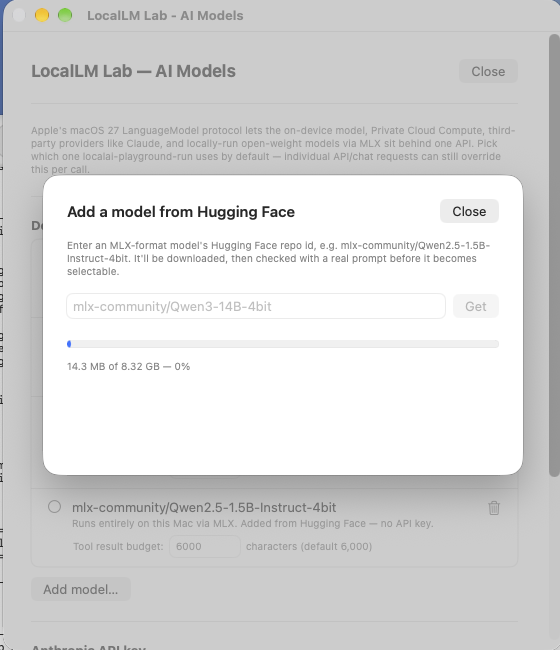
mlx-community/Qwen3-14B-4bit.Once it's downloaded, a local model behaves like any other model in the app. You can take a prompt you've tried on Apple's on-device model or on Claude, run it on a downloaded Qwen or Gemma instead, and compare the answers, with the same connectors and MCP tools in play.
↑ TopWill it fit? Memory, quantization and mixture-of-experts
Apple Silicon Macs have unified memory: the GPU runs the model from the same memory as everything else. A model needs room for its weights, plus room for the conversation (the context, which grows with every turn and every tool result), plus room for macOS and your other apps.
- Comfortable: weights up to about half your Mac's memory. Above that, LocalLM Lab warns you before downloading.
- Tight: up to about 70%. It loads, but long prompts or a busy Mac can push it into a stall.
- Too big: above 70%, where the SDK's own check flags it as too big. Expect it to fail or be stopped.
| Mac | Comfortable weights | Tight | Too big |
|---|---|---|---|
| 24 GB (for example a MacBook Air) | up to 12 GB | 12 – 16.8 GB | over 16.8 GB |
| 64 GB (for example a Mac Studio) | up to 32 GB | 32 – 44.8 GB | over 44.8 GB |
Quantization is what makes larger models fit. A 4-bit model stores each weight in about half a byte instead of two, so a 14-billion-parameter model is about 8 GB instead of 28 GB. Lower precision costs some quality; 4-bit is the usual trade, and 6-bit or 8-bit are worth it when memory allows.
Mixture-of-experts (MoE) models, such as Qwen3-30B-A3B or Gemma 4 26B-A4B, need memory for all their weights but only use a few billion parameters for each word they write. They're much faster than a dense model of the same size: in our tests on a Mac Studio, two MoE models answered the GitHub test in about 10 seconds, against 35 seconds for a dense 9B model. On a 64 GB Mac an MoE model is often the best trade.
Speed doesn't follow size simply. On a 24 GB Mac, Qwen3-14B answered the same prompt faster than Qwen3-8B (245 s against 360 s). A fanless MacBook Air also slows down as it heats up during a long generation. Measure on your own Mac; the Prompt Playground's Benchmark switch records time to first token and tokens per second.
↑ TopSafe downloads
Three checks run before a model is kept:
- Preflight. Before anything downloads, LocalLM Lab reads the size of the model's files from Hugging Face and compares it with your Mac's memory, and warns you if the weights are more than half of it. It counts the current files only: a repo's own size figure can include old versions and overstate a model by double (one 8-bit model reports 58.1 GB for 29.5 GB of files).
- Pinned and hash-checked. The model is fetched at one exact Hugging Face version, because a repo's owner can change what its name points to at any time. Every file is checked against the hash Hugging Face reports for it, so a corrupted or swapped file fails the download instead of being run.
- A capability probe. After the download, the model is loaded and given two small tasks: answer a prompt, and call a test tool. A model that can't run at all isn't added. A model that runs but can't call tools is added, with a note.
A download can still fail for reasons that have nothing to do with your Mac. In October 2026,
most of mlx-community's Ministral 3 conversions listed weight files their repos
don't contain, so nothing could load them. The model list
names the broken ones and the conversions that work.
The runtime: MLX in Swift
LocalLM Lab runs models with mlx-swift-lm, the Swift side of the MLX project, built into the
app. That has two consequences worth knowing.
- The architecture has to be implemented in Swift. Every model declares an architecture (its
model_type), and the runtime needs code for it. Python's MLX tools and the Swift runtime support different sets, so a model that runs in Python isn't guaranteed to load here. The runtime covers about sixty architectures, including Qwen, Gemma, Mistral, Llama, Granite, Nemotron, LFM, GLM, OLMo and gpt-oss. - Tool calling depends on the runtime's parsers. Each model family writes tool calls in its own format, and the runtime needs a parser for each one (more on this below).
LocalLM Lab 2.1 moves to a much newer runtime than 2.0, pinned to one exact version so every copy of the app runs the same code. It adds Muse Glimmer, a 30B agent model; lets gpt-oss call tools, by parsing OpenAI's Harmony format; and fixes Gemma 4 tool calls whose arguments are lists.
2.1 also changes how the app talks to a model. It fits each conversation to what the model's chat
template can show, which lets GLM-4, Llama 3.1 and Mistral Small 3.2 use tools (see
where it breaks). It downloads repos that keep some files in a subfolder, such as
mlx-community's OptiQ conversions. And the capability check after a download has a time
limit, so adding a model can no longer hang.
LocalLM Lab 2.2 adds Nemotron 3.5: the Lightning 30B, Bolt 74B and Super-VL 120B text builds load and
call tools, and the thinking switch works for them. Builds that take images (nemotron_h_omni)
don't load yet. The model list names the conversions that work.
How a local model calls tools
A model that writes fluent prose isn't automatically one that can use your connectors or an MCP server. Those are separate skills, and with a local model every step happens on your Mac:
- Advertise the tools. The app passes the tool definitions to the model's chat template, a small program shipped with every model that turns a conversation into the exact text the model was trained on.
- The model writes a call. If it decides to use a tool, it writes the call as text, in its family's own format: Qwen's
<tool_call>JSON, Gemma'scall:name{…}, Mistral's[TOOL_CALLS], OpenAI's Harmony, and others. - The runtime recognizes it. A parser for that format turns the text into a structured call. A malformed call, or a call to a tool that wasn't offered, is rejected.
- The app runs the tool and passes the result back through the chat template.
- The model answers from the result, or calls another tool.
Where it breaks
Every link in that chain has failed for some model we tested:
Phi-4 and every DeepSeek model we tried ship chat templates with no way to list tools, so the model never learns they exist. Phi-4 says honestly that it can't look; the DeepSeek R1-Distill models invent a whole commit and release history instead.
Sometimes it's the conversion, not the model. Mistral Small 3.2 was trained for tools, but its
mlx-community conversions ship no template that can show them. When a model's vocabulary
has Mistral's tool tokens and its own template can't list tools, LocalLM Lab 2.1 uses Mistral's own
tool format instead; the 4-bit Mistral Small 3.2 now passes all our tests. Mistral Nemo and Codestral ship no
template at all and still can't use tools.
Some templates only work with the conversation in their own shape. GLM-4-0414's shows a tool's
result only under its own observation role, so the model never saw results and kept
repeating the same call. Llama 3.1's refuses a message with more than one tool call. LocalLM Lab 2.1
reshapes the conversation for both, and both now use their tools.
Phi-4-mini's template looks for tools inside the system message, and SmolLM3's looks for differently named variables. Neither sees the tools yet.
gpt-oss writes a correct call in OpenAI's Harmony format. In LocalLM Lab 2.0 the runtime had no
Harmony parser, so the call showed up as raw text in the answer; 2.1 parses it. Mistral 7B v0.3
writes Mistral's older list form, [TOOL_CALLS] [{…}], which the current parser
rejects. Its 2024 conversion's template also drops tool results, so it can't finish a tool loop.
OLMo 3 writes its calls as <function_calls>, which no parser reads yet.
Gemma 4 E4B sometimes describes the calls it plans to make and asks you to confirm, instead of making them. It did this in some tries and not others.
The most important failure to watch for. A model can call the right tools and still put things in its answer that the tools never returned. In one run Qwen3.6-35B-A3B listed five commits that don't exist, hashes included, next to real ones; in the next run it invented nothing. Check a new model's answers against the source before trusting it.
Many current models also think out loud: Qwen 3.5 and later return their reasoning before the answer. The tuning sheet's thinking switch turns it off for models that support it.
↑ TopHow we test models
Every model on the model list with a result has been through real tool calls in LocalLM Lab, not a benchmark score. The main test connects GitHub's MCP server to a real public repository and asks an open question that doesn't name any tool:
Repository: humanizer. Owner: ancientcomputing. Use the GitHub MCP server. Look at the repository's recent commit history and its release history, and tell me: has this project been more active in development recently than its release cadence suggests, or vice versa? Support your answer with specific commits and release dates.
To answer well, the model has to decide on its own to fetch both the commit history and the release history, then cite what came back. Every commit hash, date and release tag it cites is checked against the repository. Three shorter tests check the rest of the chain: a local echo tool (does a call get through at all?), a Hugging Face lookup with exact answers, and a two-step documentation lookup where the second call needs an ID from the first.
What we've found so far:
- Mistral is the strongest family. Magistral Small, Ministral 3 (3B and 14B), Devstral Small 2 and, with 2.1, Mistral Small 3.2 all ground their answers in what the tools return.
- Gemma 4 gives the most precise answers when it calls tools: the 12B on a 24 GB Mac, the 31B on a 64 GB Mac. It needs LocalLM Lab 2.1 or later for tools that take lists.
- Qwen calls tools at every size we tried. Qwen3.6 27B and Qwen3.8 27B are reliable on a 64 GB Mac. Qwen3.5-9B grounded its answers best of the small ones in our scripted tests, but its tool calls now usually fail (known issue).
- GLM 4.7 Flash works at 6-bit and 8-bit but not at 4-bit, and Muse Glimmer 30B works on 2.1 or later, accurately but slowly.
- Nemotron 3.5 (Lightning 30B, Bolt 74B, Super-VL 120B) and Liquid AI's LFM2.5 (8B and 24B) use tools in our hand tests on 2.2. Nemotron 3.5 needs LocalLM Lab 2.2.
- Size matters for grounding. Models under about 10 GB usually call the tools but cite little or invent details; Ministral 3 14B and Gemma 4 12B are the exceptions.
- DeepSeek, Phi-4, SmolLM3, OLMo 3, Mistral Nemo, Codestral and Mistral 7B can't use tools in the app.
Every result is a point in time: conversions, chat templates and the runtime all change. If you're
building on a model, check it yourself; the SDK's capabilityProbe runs the same checks
as the app's download probe.
Tuning, speed helpers and adapters
Every downloaded model has its own tuning settings: temperature, top-p, top-k and min-p, a seed, a maximum output length, a repetition penalty, the prefill chunk size, and a switch that turns off the thinking pass. Each starts off, meaning the model's own default. Settings are saved per model version and travel with your configuration profiles.
A model can also be paired with a second, smaller download. There are two kinds:
| Speed helper | Specialization adapter (LoRA) | |
|---|---|---|
| What it is | A much smaller model from the same family. It drafts a few tokens ahead and the big model checks them together (speculative decoding). | A small file of adjustments that changes how the model writes, without a second full model. |
| What it does | Can make replies faster. Usually the same text, though it can differ slightly. | Changes the output, everywhere the model is used: Prompt Playground, API Lab and the command line. |
| Memory | Loads next to the model: about the helper's size extra. | Loads its own copy of the model while in use: about the model's size extra. |
| Must match | The model's tokenizer — in practice the same family — and be much smaller. | The exact architecture and quantization it was trained for. |
On a 24 GB Mac, Qwen3-0.6B made Qwen3-4B about 17–25% faster. The pairs we've tried, with repo ids you can paste, are in the model list's speed helpers and adapters; the steps are in the guide's tuning and pairing sections.
The same machinery is in the SDK. The AI Models panel is a thin layer over
MLXModelProvider, the type your own Swift app uses to download and run open-weight
models, with the same pinning, preflight and capability probe. Tuning and pairing are
SessionOptions, pairDraftModel and pairAdapter. See
running downloaded models safely on the SDK page, and its working examples; the
MLX Control Room
example shows each setting with a gauge that proves it changed something.
Try it yourself
Download LocalLM Lab, pick a model from the model list that fits your Mac, connect the GitHub MCP server, and run the prompt above against a repository you know. Whether a model gives grounded, checkable answers, or quietly can't, is exactly what to find out on your own Mac before you build on it.
Contact
Questions about a model, a test, or something this page doesn't cover? Contact neuron@thisbrain.ai or join our Discord.
↑ Top