 LocalLM
A prompt cache for local chat
Why a chat with a local model gets slower with every turn, and what SDK 3.0 does about it
For developers building a chat app on the SDK with a model that runs on the Mac (MLX). It does not apply to Apple’s on-device model or hosted models.
The short version. A model has no memory between requests. To answer your next message, your app sends it the whole conversation again, and the model reads all of it before it writes a word. That reading is the wait before the first word of the reply. In SDK 3.0 the model remembers what it already read, so a follow-up reads only what is new. It is on by default, uses memory only by default, and does not change how good the answers are.
Contents
The problem: every turn re-reads everything
Take a chat about a 14,000-token document. Turn one reads it. Turn two sends the document, the first answer and your new question, so the model reads the document again. Each tool call in a tool loop does the same. With a hosted model that is cheap and fast. On a Mac it is the slowest part: a 12-step tool loop over a long document took about 4½ minutes in SDK 2.x, with each step slower than the last. Long prompts also made memory balloon far past what the model needed, so big prompts were refused or squeezed the rest of the Mac.
What 3.0 does
- Remembers what it read. When a request starts the same way as an earlier one (the next turn, the next tool round, another question about the same document, the same system prompt), it picks up from there. Switching back to an earlier conversation works too.
- Does not change answer quality. Restoring saved work gives exactly what a fresh read would. Compared with running with the cache off, wording can differ slightly because of rounding. We checked that the average quality score is the same and read every differing answer by hand.
- Is on by default, within limits. Memory only, never disk unless your app asks, and within a budget sized to the Mac: about 14 GB on a 64 GB Mac and about 3 GB on a 24 GB one.
- Works with models we did not check. Verified families (Qwen3.5 and 3.8, Qwen3, Qwen3 MoE, Llama, Nemotron 3.5) are on straight away. Any other model gets a self-test the first time it is used (1 to 4 seconds, once per model version on each Mac). If it passes, the cache turns on. If a model’s memory can’t be saved and rewound, it is reported as not supported and runs normally.
- Keeps memory in check. It caps the leftover memory MLX holds on to, reads oversized prompts in smaller pieces before refusing them, and gives its own memory back before it would cause a refusal.
- Fails safe. A damaged or missing cache file, a killed app or a slow Keychain means no reuse this time. It never means a crash or a wrong answer.
What it is worth
Measured on a 64 GB Mac Studio (M5 Max). First word is the wait before the reply starts.
| Scenario | SDK 2.x | SDK 3.0 |
|---|---|---|
| 12-step tool loop over a 14,000-token document (Qwen3.8 27B, an open-weight model with 27 billion parameters) | 272 to 295 s | 47 s |
| Switching back to an earlier conversation | 15 s to first word | 2 s |
| Another question about the same 56,000-token document | 85 s to first word | 1.8 s |
| Same long system prompt after reopening the app (disk tier on) | 30.5 s | 3.4 s |
| A 56,000-token document: memory the process holds | 53 GB | 24 GB (4-bit) |
| A 230,000-token document (Qwen3-30B-A3B) | Refused | Runs in 43 GB |
The cache does not make the first read faster: a 211,000-token document took about 590 s to read either way. These are our numbers on one Mac; yours will differ with the model and the machine.
In a chat app
In a chat with a 23,000-token document, every follow-up read only the previous answer and the new message (a few hundred tokens), where 2.x read about 24,000 each turn. A few things make a turn slower, though never different: a speed-helper model (it turns the cache off), changing the tool set, trimming old messages, image turns, and very long previous answers.
Short one-off requests also take memory now (about 330 MB each on Qwen3.8), and can push a long chat out of the cache sooner. If your app runs many small requests next to a chat, expect the chat to be restored less often.
Using it
// Default: on, memory only. Nothing to write.
let provider = MLXModelProvider()

// Turn it off for the whole provider
let off = MLXModelProvider(promptCache: .off)

// Skip it for one session, for example a benchmark
let options = SessionOptions(bypassPromptCache: true)

// Keep saved work across relaunches (opt in, encrypted)
let persistent = MLXModelProvider(promptCache: .tiered())

// Show your users what it is doing
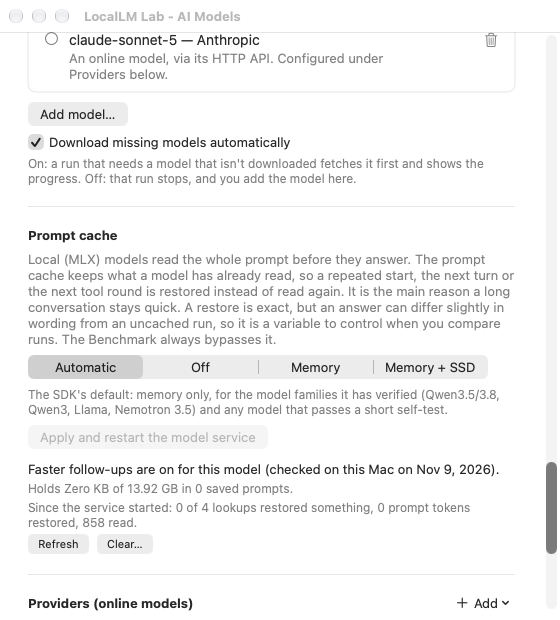
let status = provider.promptCacheStatus(for: modelID)
promptCacheStatus(for:) returns a state and a plain sentence you can show, such as “Faster follow-ups are on
for this model (checked on this Mac on Oct 5, 2026).” MLXPromptCacheStats reports what the cache did.
clear() and storedBytes on your MLXPromptCacheDisk (or
MLXModelProvider.clearPromptCache()) manage the on-disk copy. Before quitting while a reply is still being
written, call await MLXModelProvider.stopGenerating() so the GPU has stopped.
The disk tier
With .tiered() the saved work also goes to disk so it survives a relaunch. The files are encrypted (with AES-GCM, a standard method that also detects tampering) using a key kept in the
Keychain, excluded from backups, and deleted by Clear. They hold the model’s working state from your users’ conversations, so
offer your users a way to clear them. Only turn the disk tier on if your app needs the speed after a relaunch.
Where this comes from
The design follows oMLX, the Python server for MLX models, whose core ideas we studied and ported, with Apache-2.0 attribution: matching on the prompt’s actual tokens, saved restore points for models whose memory can’t simply be cut back, a memory tier plus a disk tier, and a dedicated restore point for the system prompt and tools. We differ in being a library built into each app, not a server, and in reusing whole saved conversations, which is simpler and shares less between prompts. We haven’t run oMLX head to head on the same Mac, so this is a design comparison, not a speed race.
Limits
- Local MLX models only. Apple’s on-device model and hosted models have their own handling.
- Models with sliding-window layers, such as Gemma 3, are reported as not supported and run normally. (In those models some layers look only at the most recent part of the conversation, so their saved memory can’t simply be cut back and reused.)
- Compressing the saved memory (8-bit or 4-bit) is available as an opt-in, but it is not exact and not on by default.
- The numbers above are from one machine and from our own runs. Measure on your own Mac, and again after you change models.
New to a term (token, KV cache, MLX)? See the glossary. More: tool cost and the tool picker · SDK overview · migrating to 3.0