 LocalLM Lab
Local AI Models on Apple Silicon
Download open-weight models from Hugging Face. Run them entirely on your Mac. Put them to work with real tools.
LocalLM Lab 1.0 lets you download open-weight models straight from Hugging Face and run them locally, alongside Apple's built-in on-device model and Claude — in the same app, using the same Prompt Playground, the same connectors, and the same MCP client. (New to 1.0? Start with the overview, or the SDK page if you're building on it.)
This page is the companion field report: with a downloaded model doing the reasoning, which models are worth downloading, which quietly can't use tools at all, and a real, reproducible test we ran to find out.
The same machinery is in the SDK. The "AI Models" screen is a
thin UI over MLXModelProvider — the exact type your own Swift app
links to download and run open-weight models. If a model tool-calls well in the
app, it tool-calls well in your app. See
the SDK's model-layer examples,
and note the run below predates the current MCP client — treat it as a guide to
model families, not exact scores.
What "AI Models" actually gives you
Open the AI Models chooser in LocalLM Lab and, next to Apple's
on-device model, you'll find an Add Model flow that pulls
4-bit-quantized checkpoints directly from Hugging Face's
mlx-community org — the same MLX format the Mac's own silicon is
built to run efficiently. Once downloaded, a local model behaves like any other
model in the app: pick it from the chooser, and everything else — Prompt
Playground, connectors, MCP servers — works against it unchanged.
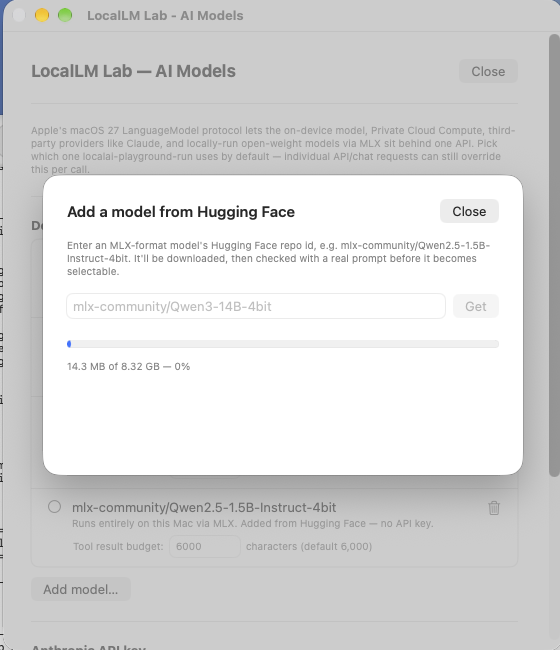
mlx-community/Qwen3-14B-4bit.That "unchanged" part matters more than it sounds. It means you can take a prompt you've already tried against Apple's on-device model or Claude, point it at a downloaded Qwen or Gemma checkpoint instead, and directly compare what actually comes back — same connectors, same MCP tools, same UI, just a different model doing the reasoning.
Before you download anything sizeable, LocalLM Lab runs a pre-flight check: it compares the model's reported size against your Mac's physical memory and warns you if it's likely to be a rough fit, rather than letting a too-large model silently stall or get force-quit partway through a run. Good headroom to look for: a model's 4-bit weights at well under half your Mac's RAM, since inference needs meaningful memory on top of the weights themselves for context and activations.
Testing them for real: connectors and the MCP client
Downloading a model is the easy part. The interesting question — the one this
page is really about — is whether it can actually use tools: your
Mac's connectors (Calendar, Reminders, Contacts,
Location) and real, production MCP servers
(GitHub, Linear, Slack, Notion, Todoist, and more) via LocalLM Lab's MCP client.
A model that writes fluent prose isn't automatically a model that can call
list_commits correctly, or at all — those are different trained
capabilities, and it turns out they vary a lot model to model.
To find out, we ran the exact same task — a prompt that requires calling two specific tools on a real MCP server and grounding the answer in what they return — against every open-weight model we could reasonably fit on a 24 GB Apple Silicon Mac.
The GitHub MCP test
Connected to GitHub's MCP server using LocalLM Lab's MCP client, pointed at a real public repository, and gave every model the same open-ended prompt — nothing in it names a specific tool:
Repository: humanizer. Owner: ancientcomputing. Use the GitHub MCP server. Look at the repository's recent commit history and its release history, and tell me: has this project been more active in development recently than its release cadence suggests, or vice versa? Support your answer with specific commits and release dates.
Answering it well requires the model to independently decide to call both
list_commits and list_releases, then actually cite
what came back — real commit hashes, real dates, real release tags — instead
of just asserting a plausible-sounding conclusion. That's a genuinely useful
proxy for "can this model use MCP tools for real work," and it's easy to score:
either the specifics it cites match the real repo, or they don't.
What we found, model by model
15 rounds, one Mac (M3, 24 GB), one repo, one prompt. The short version: Qwen's whole size range tool-calls reliably, three other families (Granite, Gemma, Mistral) do too with varying grounding quality, and a surprising number of well-regarded models either can't tool-call at all or hit a real app-side gap that has nothing to do with the model's own ability.
| Model | Size (4-bit) | Tool use | What actually happened |
|---|---|---|---|
| Qwen3 (4B / 8B / 14B) | 2.3 – 16.6 GB | Reliable | Calls the right tools across every size tested. Grounding quality varies — 14B cited release dates only to the day, 8B dropped 2 of 3 releases and hallucinated a timeframe — but the tool-calling mechanism itself never fails. |
| Gemma 4 (12B, OptiQ 4-bit) | 9.1 GB | Best local result | Called both tools correctly and cited all three release timestamps to the second — the first local model to match Claude's precision. One small fabricated detail in a commit summary kept it just short of a clean pass. |
| Ministral-3-3B | 4.7 GB | Clean grounding | Correct tool selection plus one sensible extra call, every commit and release cited accurately, zero fabrication — the cleanest pure-accuracy result outside Claude and Gemma 4. |
| Granite 4.0 (h-tiny) | 3.9 GB | Tool-calls, wrong tools | First non-Qwen family confirmed to genuinely reach for tools — but picked get_file_contents/get_latest_release instead of the commit/release-history tools the prompt actually needed, so half the answer was ungrounded. |
| gpt-oss-20B | 11.2 GB | App gap, not a model gap | Reasoned correctly and formatted a real tool call in OpenAI's native "Harmony" format — but the underlying MLX runtime has no parser for that format yet, so the call is never dispatched and leaks into the visible answer as raw text. |
| Phi-4-mini & SmolLM3-3B | 1.7 – 2.2 GB | Tools never reach the model | Both ship chat templates that genuinely try to advertise tools, but expect them supplied in a shape the app doesn't currently produce — so the model never sees a tool definition at all. SmolLM3 then confidently fabricated commit dates and counts instead of saying so. |
| Phi-4 (14B, full) | 8.2 GB | No tool-calling mechanism | Zero tool calls — but honest about it, offering step-by-step instructions for a human to check GitHub manually instead of inventing an answer. Its chat template has no tool-calling concept at all, despite the model's "instruction/tool-tuned" reputation. |
| DeepSeek (4 checkpoints tested) | 4.5 – 8.6 GB | No tool-calling mechanism | Every DeepSeek checkpoint tested — two lineages, two sizes, two base architectures — never calls a tool, traced to chat templates with no working tool-calling convention. Some fail honestly; the R1-Distill line confidently invented entire fictional commit and release histories instead. |
Every row above comes from a real trace captured from the app's own dev log — exact elapsed times, tool calls, and raw model output, cross-checked against the repository's actual commit and release history, not summarized from memory.
Fit criteria: what "will this run well" actually means
Downloading whatever looks interesting on Hugging Face isn't a great strategy — this is the checklist that came out of the testing above for judging whether an open-weight model is a reasonable pick for your Mac, roughly in the order to check them:
- A Swift-side MLX implementation actually exists for the architecture. Python's MLX ecosystem and the Swift one LocalLM Lab runs on track different architecture coverage — good Python support doesn't guarantee it'll load here.
- The weights fit with real headroom, not just technically. Inference needs meaningful memory on top of the weights for context and activations — treat roughly half your Mac's RAM as the practical ceiling for weight size alone.
- The reported download size is sane. A Hugging Face repo's listed size is sometimes inflated by old revisions still sitting in its git history — the real download can be meaningfully smaller (or in rare cases, the repo can be outright broken and unloadable by anything, not just this app).
- It's a text-generation model, unless you're deliberately testing vision. Vision-language checkpoints need extra support and aren't guaranteed to handle a text-only prompt gracefully.
- The chat template actually defines tool-calling — in a form the app can drive. This is the one that surprised us most: being a strong, well-known, or "tool-tuned" model doesn't mean the underlying template exposes tool definitions in a way any given app's runtime knows how to feed in or parse back out. Check this before assuming a model will behave like the table above's "reliable" rows.
Under the hood: what we actually found breaking
A few of the failures above turned out to be genuinely interesting engineering findings, not just "this model is bad":
Two different small models (Phi-4-mini, SmolLM3-3B) ship chat templates that try to list available tools — but each expects them supplied in a slightly different shape (nested inside the system message; two separately-named variables) than the single, generic way tools are currently passed in. The tools never reach the model, through no fault of the model's chat template design or its own capability.
gpt-oss correctly reasons about which tool to call and formats it exactly right in OpenAI's own "Harmony" convention — but the MLX runtime LocalLM Lab builds on doesn't yet recognize that format, so a perfectly good tool call never gets dispatched and shows up as raw leaked syntax in the response instead.
Not every model that can't tool-call fails the same way. Some (Phi-4, DeepSeek-V2-Lite) plainly say they don't have the data. Others (DeepSeek's R1-Distill line, SmolLM3) confidently invent specific-sounding fake commits, dates, and release counts with no indication anything is wrong — a meaningfully worse outcome for a user who doesn't already know the ground truth, and worth watching for specifically when trying a new model against real tools for the first time.
Try it yourself
Download LocalLM Lab, open the AI Models chooser, pull down a model from the table above, connect the GitHub MCP server, and run the same prompt used in this test against your own repo. Grounded, verifiable answers — or a model that quietly can't produce them — is exactly what this feature is for finding out, on your own machine, before you build anything on top of a given model's tool-use ability.
Contact
Questions about this test, a specific model, or something this page doesn't cover? Contact neuron@thisbrain.ai or join our Discord.